WiFi ToF Ranging Method
This section applies the previously discussed wireless ranging techniques directly to WiFi scenarios. The fundamental idea is bilateral two-way ranging, enabling accurate Time-of-Flight (ToF) measurement between two WiFi devices.
Modern WiFi standards support ToF-based ranging. WiFi ToF estimates distance by measuring the round-trip time of signals between a wireless Access Point (Responder) and a station (Initiator). In IEEE 802.11mc, the WiFi Fine Timing Measurement (WiFi FTM) protocol was introduced to enable high-precision localization.
Protocol Principle
Due to the lack of nanosecond-level clock synchronization between the Initiator and the Responder, the difference in timestamps at the transmitter and receiver cannot accurately reflect the true signal propagation time. However, using the principle of two-way ranging, the round-trip time between the Initiator and Responder can be measured effectively.
The specific measurement process is as follows: First, the Initiator sends an FTM request to the Responder. The Responder then replies with an acknowledgment and transmits a formal FTM frame. The transmission time of this FTM frame at the antenna of the Responder is \(t_1\), and its reception time at the Initiator is \(t_2\). Upon receiving the FTM frame, the Initiator immediately replies and records its own transmission time \(t_3\). This reply is received by the Responder at time \(t_4\).
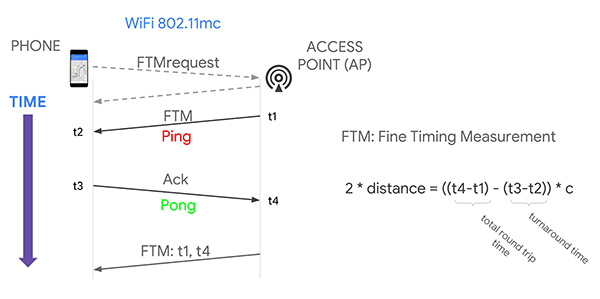
Based on the two-way ranging principle, the distance \(D\) can be calculated using the following formula, where \(c\) represents the speed of light:
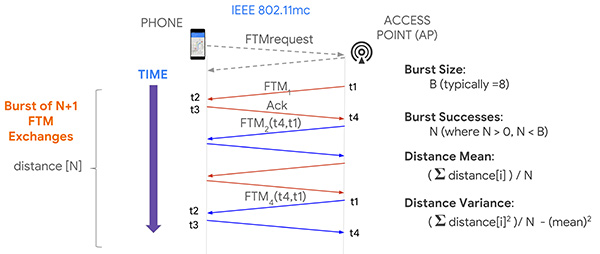
In practice, the FTM frames are transmitted repeatedly within a burst period. By averaging multiple measurements, the ranging error can be reduced.
In the FTM protocol, only the Initiator can compute the final distance. This is because during a burst request, the (N+1)-th FTM frame (sent from the Responder to the Initiator) carries the timestamp information \(t_1\) and \(t_4\) from the previous FTM response. As a result, the (N+1)-th response allows calculation of only N distance values, and only the Initiator has access to the complete set of timestamps from \(t_1\) to \(t_4\).
Think: Why does multiple measurement reduce error? How much can the error be reduced?
Performing FTM Measurements
Currently, many routers and devices support FTM. On Android systems with newer Linux kernels (>9.0), support for the FTM protocol is well established.
FTM Measurement on Android
- FTM protocol requires specific hardware support. Refer to Google's developer documentation for a list of supported devices.
- The following permissions must be granted:
<uses-permission android:name="android.permission.ACCESS_WIFI_STATE" /> <uses-permission android:name="android.permission.CHANGE_WIFI_STATE" /> <uses-permission android:name="android.permission.ACCESS_FINE_LOCATION" /> - Ranging requests must be constructed from a pre-scanned list of WiFi networks.
Sample code:
/*
* Check if the device supports WIFI RTT
*/
if (getPackageManager().hasSystemFeature(PackageManager.FEATURE_WIFI_RTT)) {
    // Device supports WIFI RTT
} else {
    // Device does not support WIFI RTT
}
// Build ranging request
RangingRequest.Builder builder = new RangingRequest.Builder();
builder.addAccessPoints(ftmAPs);
RangingRequest req = builder.build();
Executor executor = new DirectExecutor();
wifiRttManager.startRanging(req, executor, new RangingResultCallback() {
    @Override
    public void onRangingFailure(int code) {
        Log.d("onRangingFailure", "Fail in ranging:" + Integer.toString(code));
        runOnUiThread(() -> {
            Toast.makeText(MainActivity.this, "Ranging request failed", Toast.LENGTH_SHORT).show();
        });

    }

    @Override
    public void onRangingResults(List<RangingResult> results) {
        Log.d("onRangingResults", "Success in ranging:");
        // Process data

    }
});
FTM Measurement on Linux
For Linux Kernel versions 5.4 and above, install the latest iw and hostapd tools along with a modern Intel wireless adapter (e.g., AX200, AX201) to set up a ranging testbed.
To perform ranging, configure one device as the Responder (AP) and another as the Initiator (e.g., phone). Instructions are provided below.
Responder Side
First, create a configuration file hostapd.conf.
# Replace with your network interface name
interface=wlp2s0
driver=nl80211
# Replace with your NIC's MAC address
bssid=c8:58:c0:a6:67:bf
# Choose a suitable SSID
ssid=FTM-TEST
hw_mode=g
ieee80211n=1
ht_capab=[HT40+][SHORT-GI-40]
channel=2
wmm_enabled=1
wme_enabled=1
ctrl_interface=/var/run/hostapd
ctrl_interface_group=0
ftm_Responder=1
ftm_Initiator=1
Start the AP:
sudo hostapd <path_to_config_file>
If startup fails, try resetting the wireless interface:
sudo nmcli radio wifi off
sudo rfkill unblock wlan
sudo ifconfig wlp2s0 up # Replace with actual interface name
Initiator Side
Use the iw tool to scan for APs supporting FTM:
sudo iw dev <interface> scan > scan.txt # Output to file
Search for FTM in the scan output to identify compatible WiFi networks. Note down the MAC address and center frequency freq. Example (partial info shown):
BSS 20:16:b9:70:8a:91(on wlp4s0)
    freq: 2417
    SSID: FTM-TEST-2
    Extended capabilities:
         * FTM Responder
         * FTM Initiator
Create a configuration file where each line represents one Responder, formatted as:
<addr> bw=<[20|40|80|80+80|160]> cf=<center_freq> [cf1=<center_freq1>] [cf2=<center_freq2>] [ftms_per_burst=<samples per burst>] [asap] [bursts_exp=<num of bursts exponent>] [burst_period=<burst period>] [retries=<num of retries>] [burst_duration=<burst duration>] [tb]
Perform ranging:
sudo iw <interface> measurement ftm_request <config_file_path>
In practice, FTM measurement is still evolving. Current implementations typically provide only raw FTM results—the direct outcome of the bilateral two-way measurement described above. If lower-level timing data were accessible, further optimization of ranging accuracy would be possible.