Preparation for Android Sensor Development Experiments
Sensors constitute the core component of the perception layer in the Internet of Things (IoT). By accessing sensors, we can perceive various types of environmental information. To help readers gain an intuitive understanding of sensor functionality and characteristics, we have designed a series of Android smartphone-based sensor access experiments. These experiments provide students with hands-on experience and lay a foundation for future development.
Overall, abundant reference materials exist for this topic; we recommend consulting multiple sources. The most authoritative and comprehensive resource is the official Android documentation, which provides detailed technical specifications.
For inertial motion tracking using sensors, we have authored a dedicated survey paper summarizing recent advances and challenges in this field. Readers may refer to it as follows:
Zhipeng Song, Zhichao Cao, Zhenjiang Li, Jiliang Wang, Yunhao Liu. Inertial Motion Tracking on Mobile and Wearable Devices: Recent Advancements and Challenges. Tsinghua Science and Technology, 2021, 26(5): 692–705.
1. Smartphone Sensors
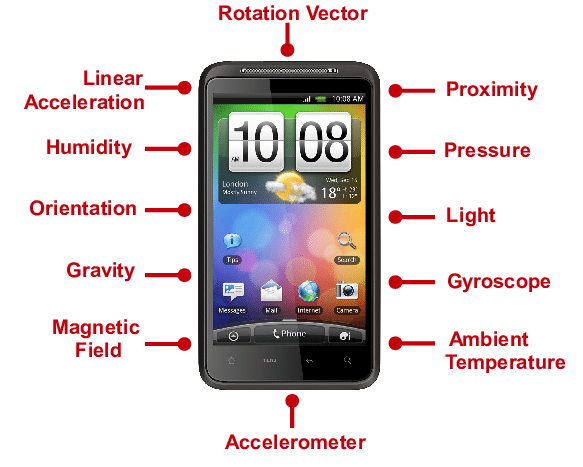
Modern smartphones integrate numerous sensors to support diverse functionalities. This section briefly introduces several commonly used sensors found in smartphones.
1.1 Ambient Light Sensor
The ambient light sensor adjusts the smartphone screen brightness according to incident ambient light intensity. In bright outdoor environments, the screen automatically maximizes its brightness; conversely, in dark environments, screen brightness decreases accordingly.
1.2 Proximity Sensor
The proximity sensor consists of an infrared (IR) LED and an IR radiation detector. Located near the phone’s earpiece, its operating principle is as follows: the IR LED emits infrared light, which reflects off nearby objects and is subsequently detected by the IR radiation detector. The distance between the sensor and the object is calculated based on the time delay between emission and reception.
1.3 Gravity Sensor
The gravity sensor operates based on the piezoelectric effect. Internally, it comprises a mass and a piezoelectric element. When mechanical stress is applied along one axis, voltage is generated across the two orthogonal axes. The magnitude and direction of the applied force can be determined from the measured voltage.
1.4 Accelerometer
The accelerometer operates on principles similar to those of the gravity sensor. When an object undergoes acceleration-induced velocity changes, inertia causes internal mechanical stress along the direction of motion; the resulting stress is converted into measurable electrical signals, enabling calculation of acceleration magnitude. Accelerometers perform multi-axis measurements and are primarily used to detect transient acceleration or deceleration events.
1.5 Fingerprint Sensor
The primary function of a fingerprint sensor is automated fingerprint acquisition. Commercial fingerprint sensors fall into two main categories: optical and semiconductor-based sensors. Optical sensors utilize principles of light refraction and reflection to reconstruct the ridges and valleys of a fingerprint surface from variations in reflected light intensity. Semiconductor sensors employ capacitive or inductive elements, reconstructing fingerprint patterns by detecting differences in capacitance or inductance values at ridge (convex) versus valley (concave) contact points.
1.6 Gyroscope Sensor
Currently, smartphones commonly use three-axis gyroscopes, capable of tracking displacement changes along six degrees of freedom.
1.7 Magnetometer Sensor
The magnetometer measures planar magnetic fields via magnetoresistance, enabling detection of both magnetic field strength and directional orientation. It is commonly employed in digital compasses and map navigation applications to assist users in achieving accurate positioning.
1.8 GPS Position Sensor
The GPS module receives satellite coordinate data via an antenna to determine the user’s geographic position.
1.9 Barometer Sensor
Barometer sensors detect atmospheric pressure changes by measuring corresponding variations in resistance or capacitance. Based on the sensing element type, barometers are classified as either variable-capacitance or variable-resistance types.
1.10 Temperature Sensor
The temperature sensor commonly integrated into smartphones monitors battery temperature to dynamically adjust operational modes. It also serves as an indicator of overall device thermal behavior.
1.11 Hall Effect Sensor
Similar to magnetometers, Hall effect sensors convert varying magnetic fields into output voltages, generating a potential difference across a conductor. Hall sensors are frequently used to implement smart cover functionality: closing the cover triggers automatic screen locking, while opening it initiates automatic unlocking.
2. Android Sensor Development
The Android operating system provides built-in support for sensors. Provided the target smartphone includes compatible sensor hardware, developers can programmatically retrieve sensor readings to infer external conditions—such as device orientation, ambient magnetic fields, temperature, and pressure.
Android offers standardized APIs for most commercially available sensors. Consequently, sensor development is straightforward: developers need only register listeners and process callback data. Below, we detail the development procedure using the built-in accelerometer as an example.
2.1 Accelerometer Development and Usage
- Step 1: Obtain an instance of the
SensorManager.SensorManagerserves as the central system service managing all sensors. All sensor interactions in Android must go throughSensorManager.
private final SensorManager mSensorManager;
// Acquire SensorManager instance in onCreate()
@Override
protected void onCreate(Bundle savedInstanceState) {
    ...
    mSensorManager = (SensorManager) getSystemService(Context.SENSOR_SERVICE);
    ...
}
SensorManager also enables enumeration of all sensors installed on the device:
List<Sensor> deviceSensors = sensorManager.getSensorList(Sensor.TYPE_ALL);
- Step 2: Retrieve the target sensor instance from
SensorManager(in this case,Sensor.TYPE_ACCELEROMETER— the accelerometer).
private final Sensor mAccelerometer;
// Acquire accelerometer instance in onCreate()
@Override
protected void onCreate(Bundle savedInstanceState) {
    ...
    mAccelerometer = mSensorManager.getDefaultSensor(Sensor.TYPE_ACCELEROMETER);
    ...
}
In addition to accelerometers, other sensor types can be retrieved similarly, including:
Sensor.TYPE_ORIENTATION: Orientation sensor
Sensor.TYPE_GYROSCOPE: Gyroscope sensor
Sensor.TYPE_MAGNETIC_FIELD: Magnetometer sensor
Sensor.TYPE_GRAVITY: Gravity sensor
Sensor.TYPE_LINEAR_ACCELERATION: Linear acceleration sensor
Sensor.TYPE_AMBIENT_TEMPERATURE: Ambient temperature sensor
Sensor.TYPE_LIGHT: Light sensor
Sensor.TYPE_PRESSURE: Pressure sensor
- Step 3: Register a listener to receive sensor data updates. Registration should occur within the
onResume()method, becauseonResume()signals that the associatedActivityhas entered the foreground. Premature registration would unnecessarily activate the sensor, wasting battery power and potentially causing resource contention among concurrent sensor users.
private final TestSensorListener mSensorListener;
// Initialize listener in onCreate(); implementation provided in Step 4
@Override
protected void onCreate(Bundle savedInstanceState) {
    ...
    mSensorListener = new TestSensorListener();
    ...
}

// Register listener in onResume()
@Override
protected void onResume() {
    super.onResume();
    mSensorManager.registerListener(mSensorListener, mAccelerometer, SensorManager.SENSOR_DELAY_UI);
}
Parameter descriptions for registerListener(SensorEventListener listener, Sensor sensor, int samplingPeriodUs):
listener: The sensor event listener implementing theSensorEventListenerinterfacesensor: Target sensor objectsamplingPeriodUs: Sampling frequency specification, with the following options:
SensorManager.SENSOR_DELAY_FASTEST: Highest frequency, minimal latency, but most resource-intensive—suitable only for applications critically dependent on sensor data. Not recommended otherwise.
SensorManager.SENSOR_DELAY_GAME: Optimized for gaming; suitable for real-time applications requiring low latency.
SensorManager.SENSOR_DELAY_NORMAL: Standard frequency—appropriate for applications with modest real-time requirements.
SensorManager.SENSOR_DELAY_UI: UI-optimized frequency—power-efficient with low system overhead, but higher latency; suitable for lightweight applications.
Additionally, when an Activity is paused or moved to the background (i.e., upon invocation of onPause()), previously registered listeners must be unregistered to release sensor resources.
@Override
protected void onPause() {
    super.onPause();
    // Unregister listener
    mSensorManager.unregisterListener(mSensorListener);
}
- Step 4: Implement the listener and override callback methods to process updated sensor readings. Underlying sensor drivers read register values directly from the sensor chip; thus, the
onSensorChanged()callback fires whenever register contents change.
class TestSensorListener implements SensorEventListener {
    @Override
    public void onSensorChanged(SensorEvent event) {
        // Read accelerometer values; event.values[0], [1], [2] correspond to x-, y-, and z-axis accelerations respectively
        Log.i(TAG, "onSensorChanged: " + event.values[0] + ", " + event.values[1] + ", " + event.values[2]);
    }

    @Override
    public void onAccuracyChanged(Sensor sensor, int accuracy) {
        Log.i(TAG, "onAccuracyChanged");
    }
}
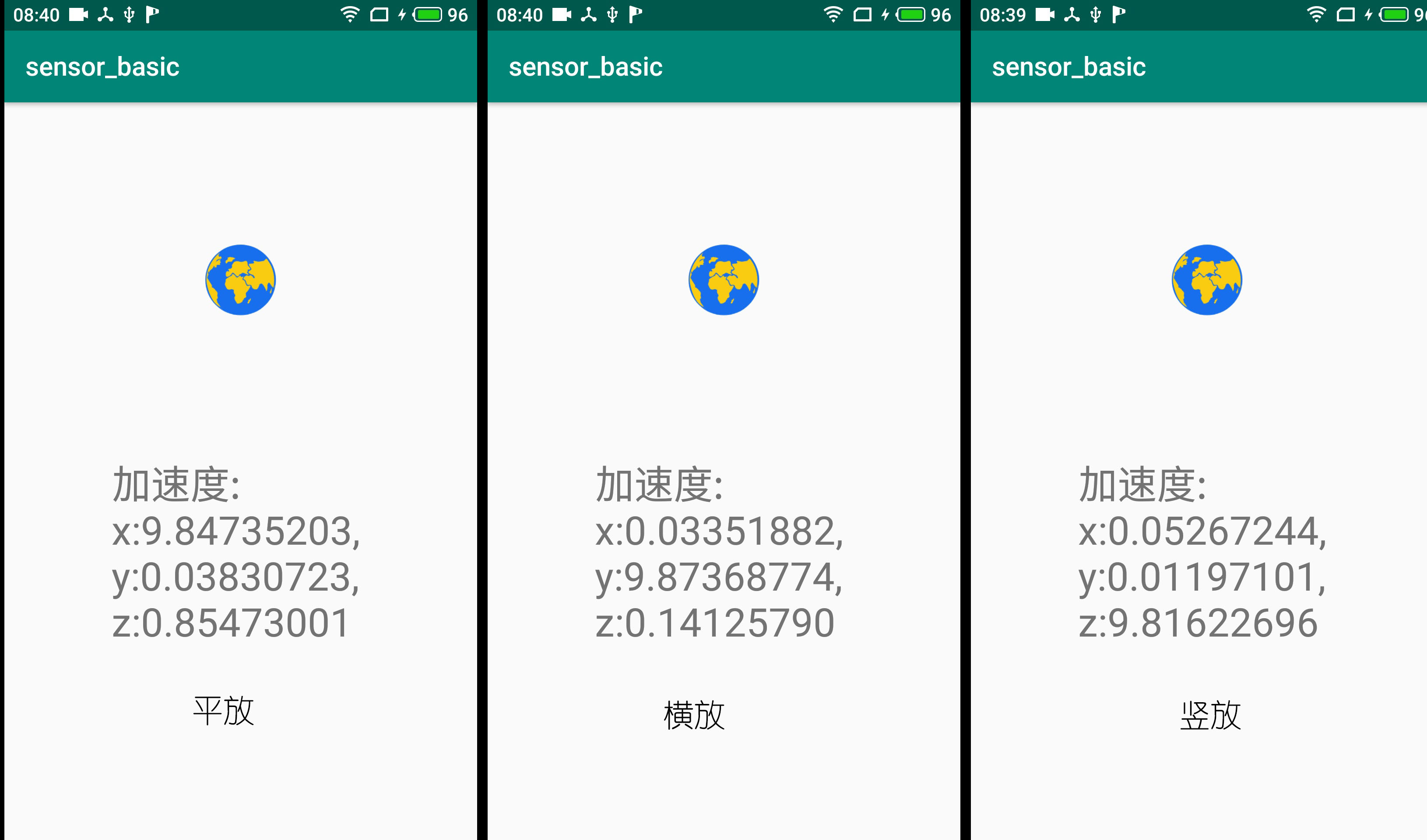
The experimental results of the accelerometer program are shown below. As expected, a constant gravitational acceleration component is consistently observed along the vertical axis (aligned with Earth’s center).